A typical enterprise MCP adoption follows a pattern. A few engineers connect assistants to useful servers. A platform team builds internal servers for the CRM, the data warehouse and the ticketing system. Within months there are dozens of servers, nobody knows which are approved, and security finds a community server with broad file system access on a developer laptop. The fix is not to ban MCP. It is to give people a catalogue of servers they're allowed to use.
How the MCP Registry is designed
The official MCP Registry launched in preview in September 2025 as an open catalogue of publicly available servers14. Three design choices matter for enterprises:
- Metadata, not code. Entries describe servers and point to packages in existing registries such as npm, PyPI and Docker Hub12.
- Verified namespaces. Server names use a reverse-DNS format, such as
io.github.username/serverorcom.example/server, tied to a verified GitHub account or domain2. That gives you a basis for trusting who published what. - Built to be extended. The registry and its API specification are open source, so others can build compatible subregistries that pull from it, filter it and add their own servers13.
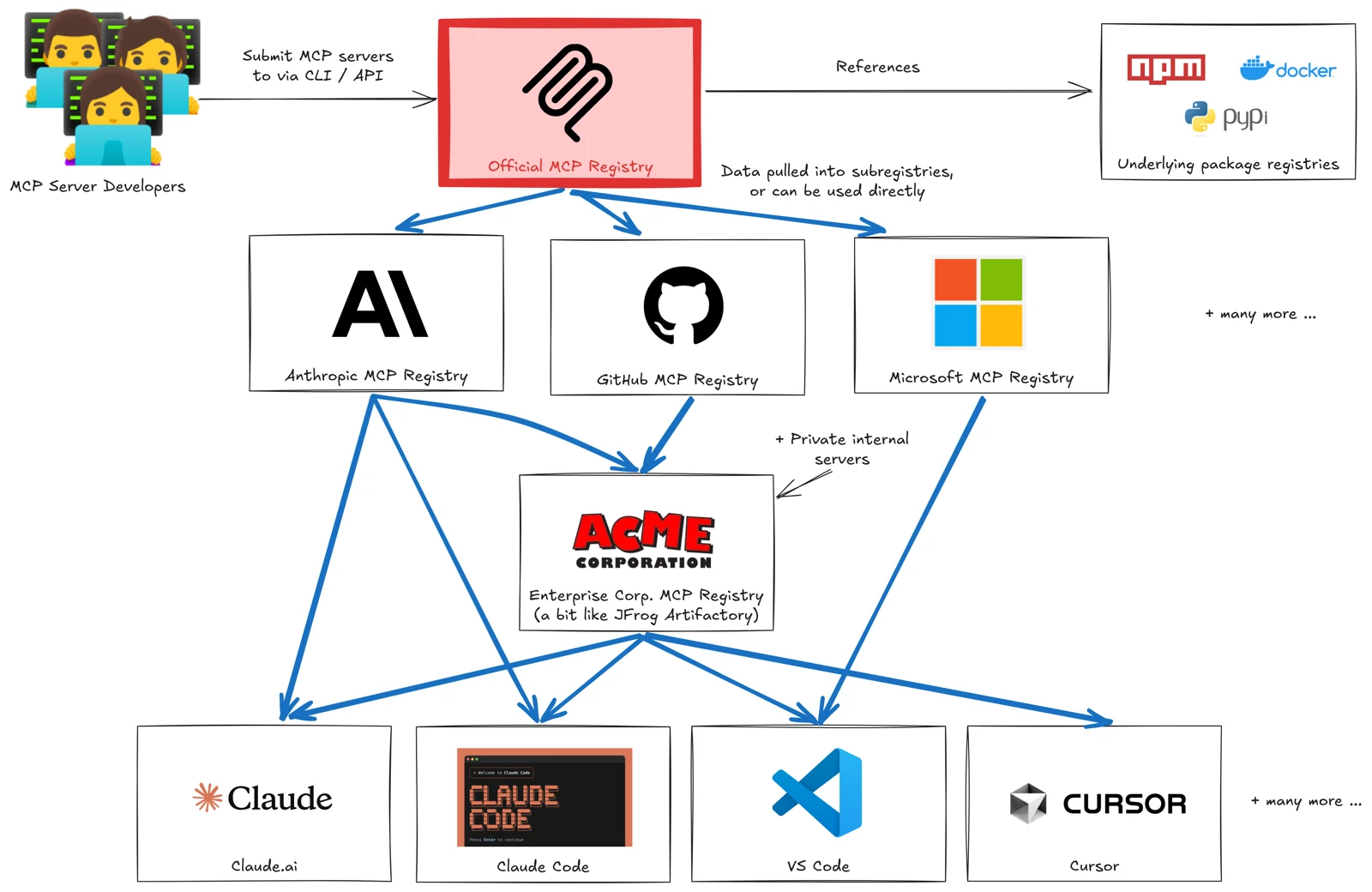
The registry remains in preview, and its documentation warns that breaking changes or data resets may occur before general availability2. Build against it, but pin and mirror what you depend on.
The playbook
1. Decide what "approved" means
Write down the criteria before choosing tools: publisher verified, source available, package signed or pinned, permissions documented, data classification of what it touches, and an internal owner. The controls in securing MCP servers make a good starting checklist.
2. Stand up a private subregistry
Run a registry that implements the same API, so clients that understand the official registry can use yours35. Servers on internal hostnames or private package feeds belong here, not in the public registry2.
3. Mirror, don't proxy
Pull public entries into a staging area, review them, then promote approved versions. Pin to specific package versions so an upstream update can't change what your users run without review. This is the same discipline as AI supply chain security.
4. Enrich entries with your context
Add what the public registry can't know: owner, data classification, allowed user groups, required auth extension, and a link to the review record. Tool annotations and UI capabilities, covered in MCP Apps and tool annotations, should be part of the review.
5. Point clients at it
Configure managed IDEs and assistants to discover servers from your registry, and where clients support it, block unapproved sources. A catalogue nobody is pointed at is just documentation.
6. Tie it to identity
Approval should map to who can use a server. Pair the registry with the enterprise authorisation patterns in MCP extensions, so access is granted through your identity provider rather than per-server credentials.
7. Measure and prune
Track which servers are used, by whom and how often, using the telemetry approach in LLM observability. Retire servers without owners or usage, and re-review on major version changes.
A registry turns MCP from a collection of personal integrations into a platform. The governance lives in the promotion step, not the protocol.
Common mistakes
- Treating the public registry as an allow-list. Listing proves a verified namespace, not safety.
- Floating versions. "Latest" from upstream means unreviewed code on every laptop.
- No owner per server. Internal servers without owners become the next unpatched dependency.
- Registry without enforcement. If clients can still add any server, the registry is advisory only.
How I can help
I design enterprise agent platforms, including MCP registries, approval workflows and identity integration, so teams can adopt tools quickly and safely. See my AI architecture work, or analyse your challenge and bring the result to a call.
- 1Introducing the MCP RegistryModel Context Protocol blog · 8 Sep 2025
- 2The MCP RegistryModel Context Protocol documentation
- 3
- 4Introducing the MCP RegistryInfoQ · Sep 2025
- 5