Enterprise agents are moving beyond chat. A tool that queries a database no longer has to return hundreds of rows as text; it can return a table the user can sort and filter. A deployment tool can present a form instead of asking twenty questions. At the same time, organisations are connecting agents to more tools from more servers, and need a way to tell a harmless lookup from a destructive action.
MCP has answers to both: MCP Apps and tool annotations. Here is how they work and how I fit them into an enterprise architecture.
MCP Apps: interfaces inside the conversation
In January 2026 the MCP maintainers announced MCP Apps as the first official MCP extension. A tool declares a UI resource, served under a ui:// scheme, and the host fetches it and renders it in a sandboxed iframe. The UI and host communicate over JSON-RPC via postMessage, so the interface can call server tools and update the model's context as the user interacts1.
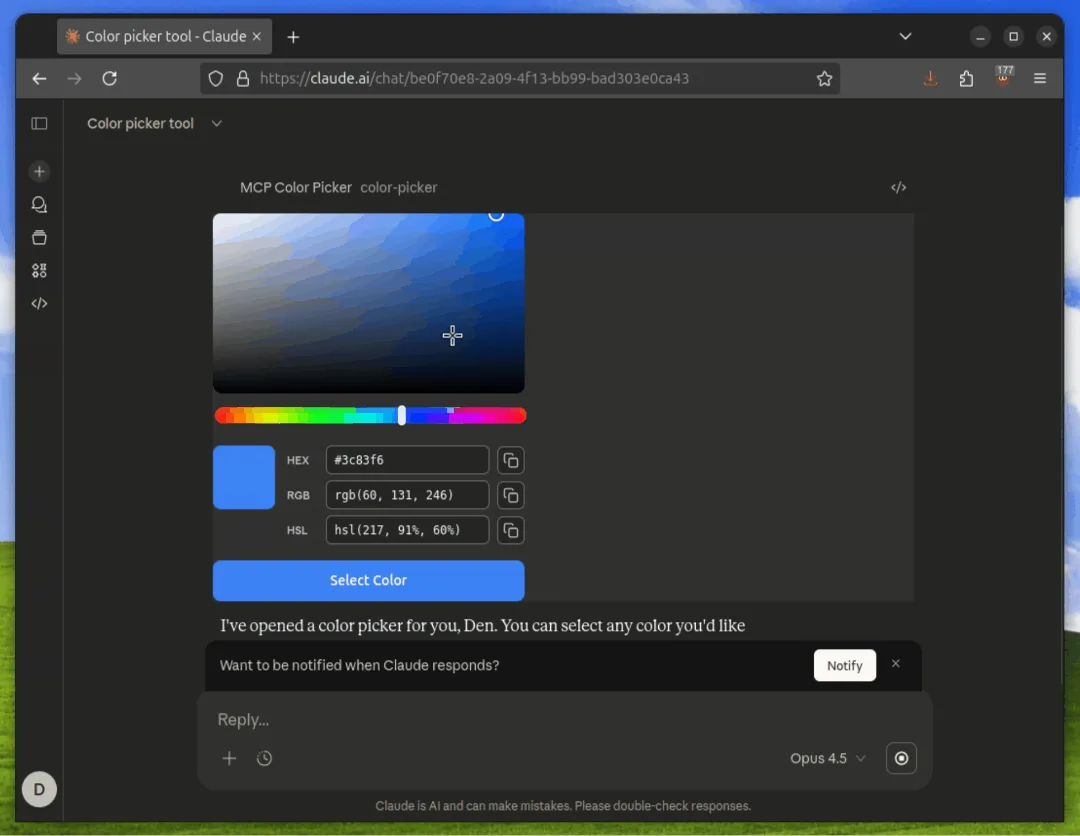
The announcement lists support across several major clients, and builds on earlier work from MCP-UI and OpenAI's Apps SDK1. For enterprise teams, the appeal is one interactive tool that works in several AI clients without client-specific code.
The security model has several layers: sandboxed iframes, templates the host can review before rendering, loggable messages between UI and host, and optional user consent for tool calls the UI initiates1. The maintainers are clear that users should still vet servers before connecting them.
Tool annotations: a risk vocabulary, not a guarantee
Tool annotations let a server describe a tool's behaviour with four hints: whether it is read-only, destructive, idempotent, or reaches an open world of external entities23. The defaults are deliberately cautious: a tool with no annotations is assumed to be able to modify things, possibly destructively, and to reach outside its environment2.
The key word is hint. The specification says annotations aren't guaranteed to describe behaviour faithfully, and clients must treat them as untrusted unless they come from a trusted server23. A malicious server can label a destructive tool read-only.
| Annotations can | Annotations can't |
|---|---|
| Drive confirmation prompts for destructive tools | Prove a tool behaves as described |
| Feed a policy engine as one input among several | Replace enforcement in a gateway or host |
| Support graduated trust for internal servers you control | Make an untrusted third-party server safe |
| Help users understand tools before running them | Detect risk that comes from combining tools |
Risk lives in the session, not the tool
The MCP maintainers' post on annotations makes a point I agree with strongly: risk often comes from combinations. Drawing on Simon Willison's lethal trifecta of private data, untrusted content and external communication5, it notes that users routinely combine tools from several servers, so the risk profile belongs to the session rather than any single server2. Several open proposals aim to add metadata so clients can detect when a session has all three legs available2.
This is the same containment logic as in prompt injection defence for agents. MCP Apps add a wrinkle: a UI that can call tools and update model context is another path by which actions happen, and it needs the same policies as the model.
How I govern them in an enterprise
- Approve servers, not just tools. Maintain an allow-list of MCP servers. Annotations from internal, reviewed servers can drive policy; from others they are informational only.
- Require annotations on internal servers, reviewed in code review like any other interface contract, and test that tools behave as annotated.
- Enforce at a gateway. Route tool calls, including those initiated from MCP App UIs, through a policy layer that checks user rights, tool risk and session state, as in securing MCP servers.
- Track session state. Once a session has read private data and seen untrusted content, block or require approval for open-world and destructive tools.
- Review UI templates for MCP Apps before approving a server, and log every UI-to-host message.
- Design approvals people actually read. Show the exact action and data affected. A confirmation dialog users click through by reflex is not a control.
Treat annotations as labels and the gateway as the lock. Labels help people and policies make decisions; only enforcement outside the model and the server stops a mislabelled tool.
Where this is heading
The annotation vocabulary is deliberately small today, with several proposals open for trust, sensitivity and output-safety hints2. Build your policy engine so new hints can be added as inputs without redesign, and record your choices in an architecture decision record.
How I can help
I design MCP architectures for enterprises, from server approval and gateways to session policies and agent UIs. See my AI architecture work, or analyse your challenge and bring the result to a call.
- 1MCP Apps: bringing UI capabilities to MCP clientsModel Context Protocol blog · 26 Jan 2026
- 2Tool annotations as risk vocabulary: what hints can and can't doModel Context Protocol blog · 16 Mar 2026
- 3Tools (specification 2025-11-25)Model Context Protocol
- 4MCP Apps extension documentationModel Context Protocol
- 5The lethal trifecta for AI agentsSimon Willison · 16 Jun 2025