Four incidents, one pattern
N-able took its hosted N-central remote monitoring and management environments offline on 9 November after proof-of-concept exploits for more than 30 alleged flaws were published, and told on-premises customers to take their servers down1. A week later, attackers were exploiting a new N-central chain within hours of its proof of concept appearing2.
Meanwhile Huntress reported a campaign against managed service providers' ScreenConnect servers: between 20 October and 16 November, attackers posing as guests made around 688,000 requests across 42 servers to push a malicious file, waiting for a technician to join a session so a flaw in the technician's client would run it3. Wiz reported that an attacker used credentials tied to Qubole's AWS account to assume roles customers had created to trust Qubole, then collected secrets and data4. And attackers used a flaw in Optimizely's sign-up flow to inject malicious JavaScript into customer projects, which then ran on customers' websites5.
These are reported as four separate stories. They are one story. Each product is a channel a vendor uses to act inside many customers at once, and each attack went after the vendor's side of that channel rather than the customer's front door.
Where vendor access actually lives
Most organisations can list their suppliers. Far fewer can list what each supplier can do inside their environment right now, without asking. That second list is the one that matters.
The common property is that the access is standing: it exists whether or not the vendor is doing anything for you today, and it is protected by the vendor's security, not yours. A remote management agent that can run any command at any time is the same risk on a quiet Sunday as it is during a support call.
Put vendor actions through the same gates as your own
The useful model comes from platforms that already treat every caller the same way. In Kubernetes, every request to the API server, from a person or from a workload, passes authentication, then authorisation, then admission control before it changes anything7. Vendor access usually skips most of that: the agent is authenticated once at install and then trusted for everything.
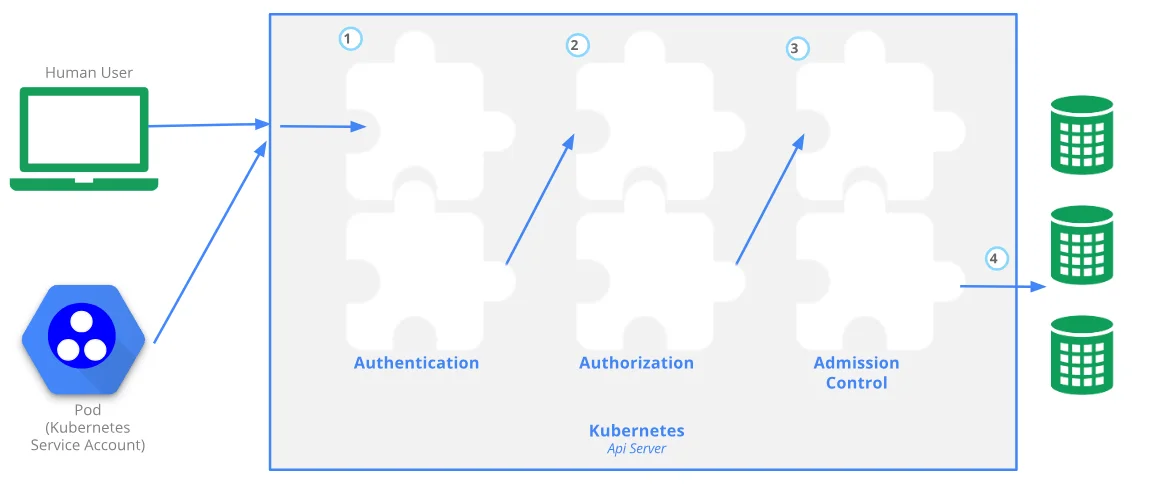
Applied to suppliers, that means three questions for every channel. Who is acting: the vendor's platform, or a named technician with strong sign-in? What may they do: everything, or a defined set of actions on a defined set of systems? And what checks the action at the moment it happens: nothing, or a policy, an approval or at least a record someone reviews?
Cloud providers have built some of this already. AWS documents the confused deputy problem for exactly the Qubole pattern, and recommends conditions such as an external ID on roles that third parties assume6. That helps against one customer tricking a vendor into acting on another's account. It does not help when the vendor's own credentials are stolen, which is why narrowing what each role can reach matters as much as how it is assumed.
What to do: a short programme, not a project
- InventoryList every agent, role, script, app consent and support path a vendor holds
- OwnerGive each one an internal owner and a reason it still exists
- RemoveDelete access for vendors and features you no longer use
- NarrowCut each remaining channel to the systems and actions it needs
- WatchLog vendor actions where you can see them, not only where the vendor can
- Cut-offRehearse switching each channel off in minutes
| Channel | This month's example | First thing to change |
|---|---|---|
| Remote management | N-central exploits1 | Limit which machines the agent covers and what scripts it may run |
| Remote support | ScreenConnect technician attacks3 | Patch technician clients; block file transfer by guests; record sessions |
| Cross-account cloud roles | Qubole roles assumed4 | Remove unused roles; keep secrets out of what roles can read |
| Third-party scripts | Optimizely injection5 | Keep vendor scripts off payment and login pages; restrict with a Content Security Policy |
The test is simple: if a vendor told you at 3am that its platform was compromised, could you cut its access to you within the hour, and know what it had done in the last month? If not, start there.
The conversation with your managed service provider
Many mid-sized companies reach remote management and remote support tools only through a managed service provider, so the exposure is real but the controls belong to someone else. That makes the contract and the questions the control. Ask which tools they run on your systems and at what versions, how technician accounts sign in, whether sessions are recorded and whether you can see the logs, and how they would tell you about a compromise of their own tooling. The MSP cyber resilience case study shows what a provider that takes this seriously looks like from the inside.
For cloud and SaaS access, the same thinking runs through the third-party cloud access case study and the machine identity case study. For web scripts, see the payment page script security case study, and for AI vendors specifically, AI inference providers are now supply chain.
The CTO's take
Supplier risk is usually run as paperwork: questionnaires, certificates, annual reviews. This month showed it is an engineering problem. The question is not whether a vendor is reputable, but how much it can do inside your environment without you noticing, and how fast you can stop it. Those are things you can measure, reduce and rehearse.
If you want a second pair of eyes on vendor access across your estate, or as part of technical due diligence, I am a fractional CTO based in India, the United States and the UAE, working globally. You can analyse your challenge and bring the result to a call.
- 1N-able takes N-central platform offline after zero-day dumpTechTarget · Nov 2026
- 2New N-able "4EverAble2Shell" zero-day exploited hours after PoC releasedBleepingComputer · Nov 2026
- 3
- 4Qubole customers targeted in AWS cross-account access attackSC Media · Nov 2026
- 5Optimizely Vulnerability Exploited to Serve Malware on Major WebsitesSecurityWeek · Nov 2026
- 6The confused deputy problemAWS Identity and Access Management User Guide
- 7Controlling Access to the Kubernetes APIKubernetes documentation