What happened
Apiiro reported that when a developer chooses "Yes, and don't ask again" for a command in Claude Code, the tool can save the command, word for word, as an allow rule in .claude/settings.local.json in the project1. If the command contained a password or API key, so does the file. Apiiro found 104,185 public copies of the file on GitHub, and real secrets in 1,122 of them13.
Claude Code's documentation describes the local settings file as personal and not checked in, and says Claude Code configures git to ignore it4. Reporting notes that this protection lives in a machine's git settings rather than the repository's own .gitignore, so it does not travel with the repository2. Apiiro's advice: search repositories and their history for these files, stop tracking them and add them to each repository's .gitignore2.
- TypeA developer runs a command with a key inline, via the agent
- Approve"Don't ask again" saves the exact command as an allow rule
- StoreThe key now sits in a project file under .claude/
- MissIgnore rules are per machine, so another setup or a forced add tracks it
- PublishThe file is pushed; on a public repository the key is exposed
- LingerDeleting the file later leaves it in git history
The wider lesson: agent files are a new place for secrets
This is not unique to one tool. Coding agents keep settings, approval rules, memory notes, session transcripts and tool configuration on disk, often inside the project directory. Any of them can capture a credential a developer typed or an agent read. Most organisations' secret controls were designed for source code and CI configuration, and do not yet treat agent artefacts as a category.
The underlying habit is also older than AI: pasting a key into a command because it is quicker than setting up proper access. Agents make that habit more expensive, because they record what they are told to do.
Controls that work, in layers
Keep secrets out of commands. Teach developers and agents to reference environment variables or a secrets manager rather than pasting values. Approval rules then contain a variable name, not a key.
Ignore agent paths in the repository. Add agent configuration directories to every repository's .gitignore and to the templates new repositories start from, rather than relying on each developer's machine.
Block at push time and scan history. GitHub's push protection blocks recognised secrets before they are pushed, and organisations can choose which patterns it covers5. Pair it with scanning of existing repositories and their history, including agent directories.
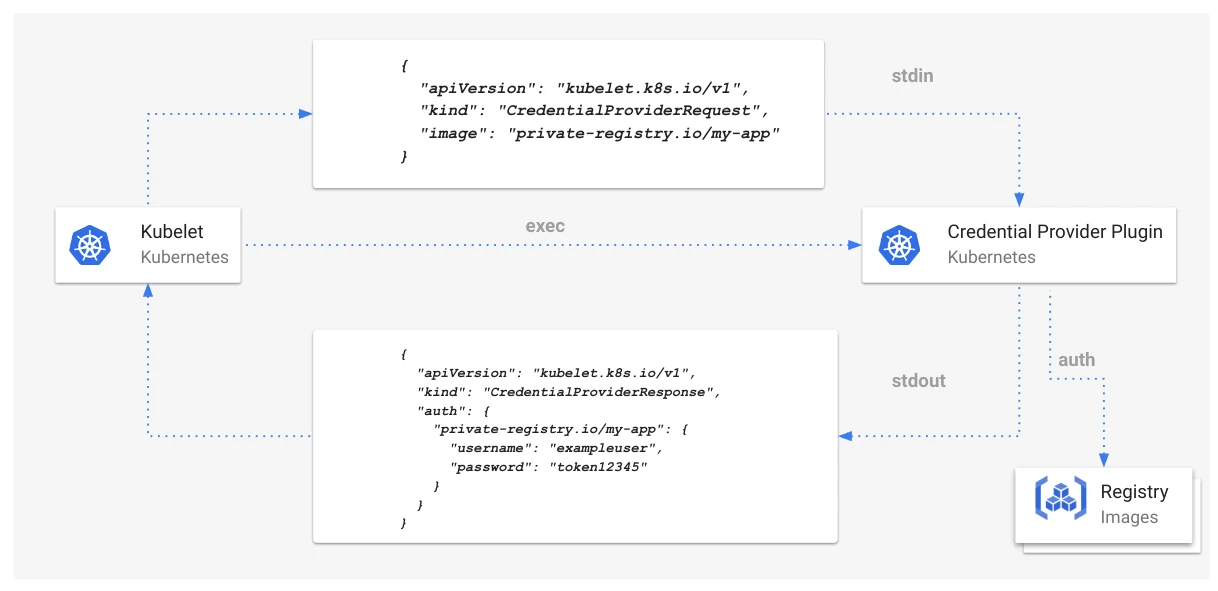
Make leaked credentials short-lived. The best defence against any leak is a credential that expires before it is useful. Fetch credentials when needed instead of storing them, the pattern Kubernetes uses for registry access6.
Govern agent settings centrally. Where your coding agents support organisation-managed settings, use them to set baseline rules, and periodically review the "always allow" lists developers accumulate. See AI coding policy for engineering teams.
Every new tool on a developer's machine is a new place for secrets to hide. Assume agents will write down what they see, and make sure what they see is never a long-lived key.
What to do this week
- Search your organisation's repositories and their history for
.claude/and other agent configuration files; rotate any secrets found. - Add agent paths to repository .gitignore files and templates.
- Turn on push protection and extend secret scanning to agent directories.
- Tell developers, plainly, not to paste credentials into agent prompts or commands.
CTO take
The Claude Code finding will be fixed and forgotten, but the pattern will recur with other tools. Coding agents are now part of the software supply chain on every developer's machine, and they generate files, memories and logs that sit outside most security reviews. Treat them like any other privileged tool: managed settings, scanning that covers their files and access through short-lived credentials. Read alongside the 9 November tech news, agentic infrastructure and the AI developer toolchain security case study.
How I can help
I help engineering teams adopt AI coding tools safely: policies, managed settings, secret controls and the identity model behind them. I am based in India, the United States and the UAE, working globally. See fractional CTO work, where I work, or analyse your challenge and bring the result to a call.
- 1Claude Code's "Don't Ask Again" File Exposes Passwords and Keys in 1,122 Public Copies on GitHubThe Hacker News · Nov 2026
- 2"Don't ask again" in Anthropic's Claude Code leaks developer secretsiTnews · Nov 2026
- 3
- 4Claude Code settingsAnthropic · 2026
- 5About push protectionGitHub Docs · 2026
- 6Kubernetes v1.26: GA Support for Kubelet Credential ProvidersKubernetes blog · 22 Dec 2022