Distributed training has an awkward property: a job that needs eight GPU workers is useless with six. On a busy cluster, the default scheduler places pods one at a time, so two large jobs can each grab half of what they need and both sit waiting forever, holding GPUs nobody else can use. For years the answer was a custom scheduler or an add-on. Kubernetes has been building the answer into the core.
How it evolved over three releases
| Release | What arrived |
|---|---|
| v1.35 (Dec 2025) | Alpha Workload API with all-or-nothing gang scheduling, plus opportunistic batching to speed up scheduling of identical pods1 |
| v1.36 (May 2026) | Workload becomes a static template and a new PodGroup API holds runtime state; a PodGroup scheduling cycle, first topology-aware scheduling and workload-aware preemption, and DRA ResourceClaims for pod groups2 |
| v1.37 (Sep 2026) | Workload and PodGroup APIs and gang scheduling graduate to beta, with workload-aware preemption and shared DRA claims; new CompositePodGroup API for multi-level groups; mutable minimum counts for elastic jobs3 |
The mechanics are straightforward. A pod group declares a minimum count. In the original design, the scheduler held pods at a permit gate until it had found placements for the whole group; if only part of the group fitted within the timeout, all of them went back to the queue and their reserved resources were released1. Later releases made the pod group the unit that is queued and scheduled23.
Why v1.37 matters
Beta means the core APIs are one step from general availability, in the project's own words3. Three changes stand out for AI platforms:
- Workload-aware preemption. A high-priority training job can preempt lower-priority work as a group, rather than evicting pods one by one in ways that don't free a usable block of GPUs.
- CompositePodGroup. Multi-level groups with topology constraints support structures commonly managed by JobSet and LeaderWorkerSet, which covers many distributed training and multi-host inference patterns3.
- Elastic minimum counts. Controllers can change a group's minimum size on the fly, so jobs can shrink or grow without interrupting pods already scheduled3.
Alpha API versions have changed with breaking changes between releases3. If you adopted early, budget time for migration.
Where Kueue fits
Gang scheduling decides how one job's pods are placed. Kueue answers a different question: which jobs may run at all, given team quotas and shared capacity. A job becomes a Kueue workload, is evaluated against its local and cluster queues, resource flavours and optional cohort, and is resumed only when admitted4.
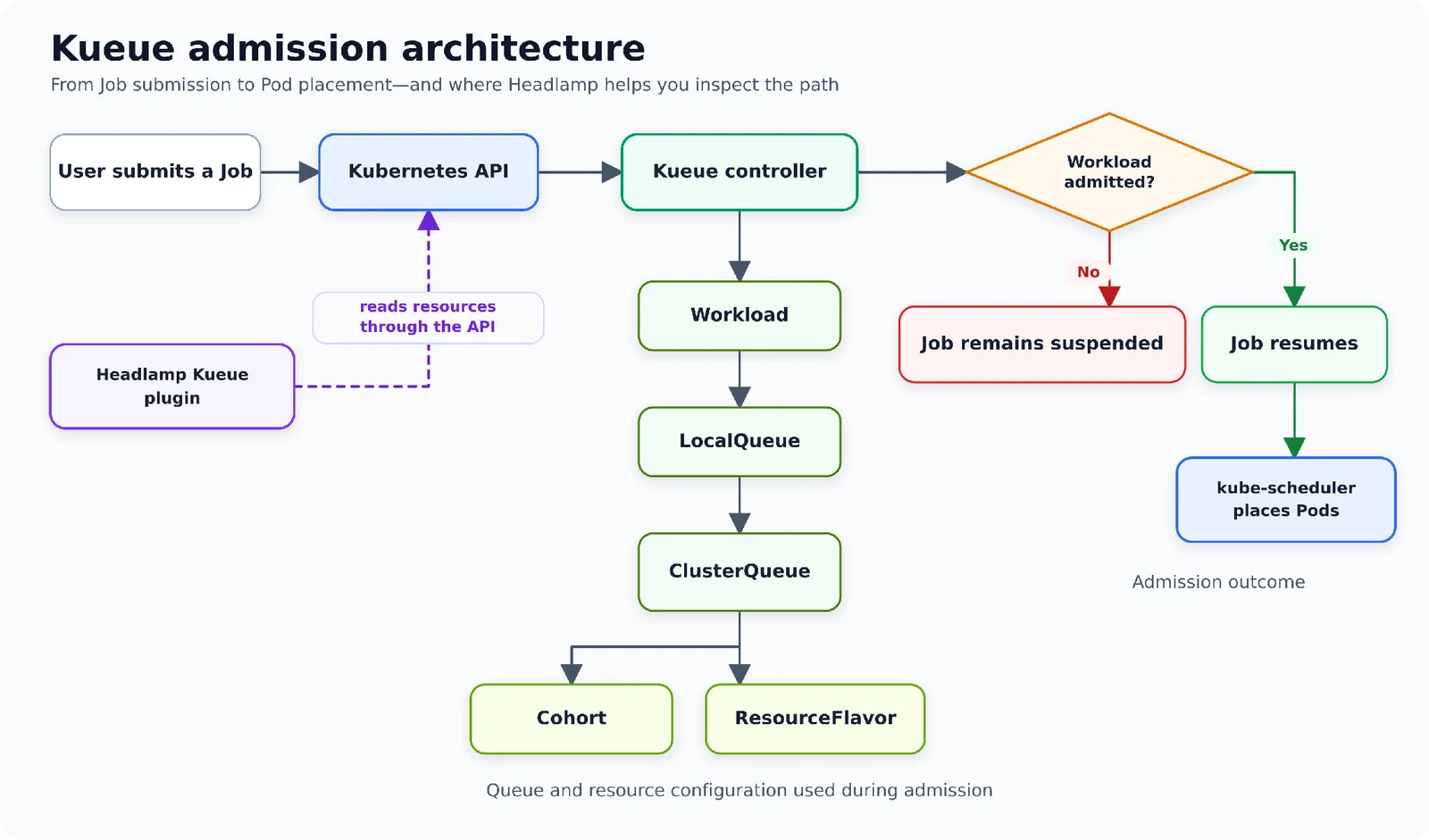
On a shared GPU cluster, I use both layers: Kueue for fairness and quotas between teams, and native gang scheduling so that admitted jobs land together. The same blog post is a useful guide to answering the most common question on such platforms: why is my job still pending?4
How I would plan a GPU cluster now
- Separate admission from placement. Quotas and priorities in a queueing layer; all-or-nothing placement in the scheduler.
- Model topology. Training performance depends on how close workers are. Use topology-aware placement where your hardware has meaningful racks or interconnect domains.
- Use DRA for GPUs, as in Kubernetes DRA for GPUs, now that pod groups can share resource claims.
- Set preemption policy deliberately. Decide which work can be interrupted, and make sure training jobs checkpoint so preemption doesn't waste hours.
- Measure idle GPU time. Partially scheduled jobs and fragmentation show up as expensive idle hardware, which the cost practices in Kubernetes FinOps and FOCUS for AI spend can make visible.
- Pilot on beta in non-production before replacing an existing custom scheduler, and keep an eye on the path to GA.
The most expensive state for a GPU is allocated but not working. Gang scheduling attacks one of the main causes of that state.
How I can help
I design Kubernetes platforms for AI training and inference, from scheduling and quotas to GPU allocation and cost visibility. See my AI architecture work, or analyse your challenge and bring the result to a call.
- 1Kubernetes v1.35: Introducing Workload Aware SchedulingKubernetes blog · 29 Dec 2025
- 2Kubernetes v1.36: Advancing Workload-Aware SchedulingKubernetes blog · 13 May 2026
- 3Kubernetes v1.37: Advancing Workload-Aware SchedulingKubernetes blog · 8 Sep 2026
- 4Why is my Kubernetes Job still pending? Tracing Kueue admission with HeadlampKubernetes blog · 14 Oct 2026